Showing posts with label AX2012. Show all posts

Sunday, October 23, 2016

Using the On-Premise Gateway to connect to your AX2012 data to Power BI Portal

PowerBI has been around for a long time by now, so there are tons of information out there on how to connect your data sources to the powerful PowerBI Portal (www.powerbi.com). Now, getting all the moving parts to connect properly might have been difficult at times, but I'm making this post to just reassure you it is currently very easy to set up.

Before I begin, I just want to add a precaution:
Consider the implications around security and performance when setting this up.

I prefer to use a common service (or setup) account for this, and not my own consultant login. This makes it a little easier if someone else needs to step in and maintain the setup. Furthermore, it allows for the customer to lock down the credentials after I've completed the setup.
As for performance, you should pay attention to how data refresh adds load to your servers, both the one hosting the gateway itself, the server hosting the data source (SQL Server and/or Analysis Services). You don't want to cause a full system overload while pulling data from your sources.

I will use the standard Dynamics AX SSAS OLAP as an example, but the point here is less the data source, and more how easy it is to connect to the PowerBI Portal.

Before we begin, I want to list some prerequisites, or at least how I would set it up:

  • You are using a dedicated setup account and this account is a domain user
  • You are local admin on the server where you plan to setup the gateway. Basically, your setup account is listed in the Administrators Group (under Computer Management, Local Users and Groups, Groups, Administrators).
  • You have access to the SQL Server Analysis Services (SSAS) with your setup account. Check by right-click SSAS instance, choose Properties and look at the list of users under Security.
  • You have a user who is Global Admin in Azure AD. This could be the setup user, synced to Azure AD from the On-Premise domain, but it's not necessary. The point is this user will have access to setup things on PowerBI which currently requires Office 365 Global Admin rights. This may change in the near future, hopefully.
Given all of the above, you'll simply start by logging on the PowerBI portal using the Office 365 Global Admin user, and download what's called the "Data Gateway". The download link is in the top and takes you to the download page. Press Download and get the latest and finest version.


When you run this installer, it will ask you to login using the Office 365 Global Admin user (which will have access to register the gateway). Also, I am using the "Enterprise Gateway" option when installing. This allows me to schedule refresh from data sources based on SSAS.
The gateway has its own set of prerequisite software, so have a look at those before you begin.

When the gateway is installed successfully, it now can be utilized to connect to ANY of the SSAS instances on the domain, given the network traffic is allowed and you connect with a user who has access to the SSAS instance. So your LIVE, TEST, DEV, and so on. How cool is that?

Next you would use the PowerBI Admin Portal to configure the Gateway and add your data sources.
Head over to the Manage gateways and click "Add Data Source".


Fill in the form. Notice I am using the name of the server where SSAS is running and the name of the SSAS instance. I also use the domain user who has access to the SSAS Server itself. I also put in the name of the OLAP, Dynamics AX Initial.


The data source should connect and confirm everything looks good for you to connect the data source and whatever it contains. Great!
A lot of people get here fine, but the next part is something which was added just recently, well actually some months ago in the 2016 April update.

Why is this update important?

Given the scenario where you're trying to connect some on-premise SSAS with PowerBI in the cloud, who's to say you're fully synchronizing on-premise Active Directory with Azure Active Directory? What if your local domain doesn't map the users perfectly with the usernames in Azure AD? This is where the "Map User Names" comes into play. We can actually add string replace rules to the usernames, so if your users are not perfectly mapped between Azure AD and On-Premise domain, you can still get this to work.

So in this example, I will assume the On-Premise domain is using a different domain name compared to the one used by Office 365 and Azure AD. On-Premise I imagine CONTOSO is actually fully qualified as contoso.eu.local, while in the cloud users are using contoso.com.

Click the Data Source you need to be mapped. Right now, these settings are not shared across data sources, but hopefully they will add further administrative improvements to this.
Open the list of Users and look at the bottom for the Map User Names button.


This will slide in the setup for mapping of user names.


Notice in my example I am replacing the long username for the powerbiadmin@contoso.com with service-account-with-access-to-ssas@contoso.eu.local. So anytime I am logged in at the PowerBI portal with this powerbiadmin-user, and I try to access the data sources through the gateway, the user principal names will be "washed" through the mapping, and "magically" the credentials for that user will work On-Premise because the local domain sees a user it recognizes. Furthermore, I added another example of a user who locally is represented by u12345@contoso.eu.local, while in Azure AD is actually tommy@contoso.com. So if this user also tries to update or refresh data sources, the credentials will work locally.

What next?

Well, you can click "Get Data", select "Database" and choose "SQL Server Analysis Services" and simply pick your preferred cube from one of your datasources and click "Connect". With the new dataset in place, you can schedule a refresh outside regular business hours. Like this:



A couple of follow-up questions:

Q) What happens if I map two completely different users, who actually both exists both in Azure and On-Premise?
A) You're the admin and while there are no features to prevent potential illogical mappings, you can map yourself into complete chaos - at your own or someone else despair.

Q) Do I need to map all users like this? 
A) Since the mapping is a simple string replace, you can replace similar parts of the username. Like replacing "@contoso.com" with "@contoso.eu.local". If you're lucky enough, this will be enough to fix most usernames. Also consider there may be a number of users who only will load the Reports, but who do not need access to actually reload the datasets with fresh data from the data sources. Surely, those users do not need to be mapped.

Q) How much time does it take to set this up?
A) With some practice, and if the users are setup with permissions like described in the beginning of this post, I bet you can get this up, connected and working within the hour. The rest will be waiting for data to come through so you can start fill your beautiful reports and dashboards with powerful data.

Q) What if it fails horribly and I get stuck? :'-(
A) Use the community forum and make sure to tag your question with "BI".

Thursday, July 7, 2016

Stored Procedure for listing who is running AX queries on the SQL Server

I want to share a small nugget I've created for listing who is currently running queries against AX at any point in time. It builds on two prerequisites, one of which is from one of my suggested answers on the Dynamics AX Community Forum and secondly a solution provided by Microsoft in their own blog.

For the sake of completeness I will include the "sp_lock3" stored procedure in this post, but it is only fair to include that I got it from the LearnSQLForum, posted by a Scott Wigham here:
http://forums.learnsqlserver.com/SqlServerTopic40.aspx

The sp_lock3 looks like this:

/*******************************************************
 Source:
 http://forums.learnsqlserver.com/SqlServerTopic40.aspx
 ******************************************************/

USE master
GO
IF ( SELECT OBJECTPROPERTY(OBJECT_ID('sp_lock3'), 'IsProcedure')) = 1
    DROP PROC dbo.sp_lock3
GO
CREATE PROC dbo.sp_lock3 (
    @spid1 INT = NULL /* Check only this spid; if this is NULL then all spids will be checked */ 
    , @spid2 INT = NULL /* and this spid; if this is not null, @spid1 must be not null as well */ 
)
AS

CREATE TABLE #locktable (
    spid SMALLINT
    , loginname NVARCHAR(128) 
    , hostname NVARCHAR(128)
    , dbid INT
    , dbname NVARCHAR(128) 
    , objId INT
    , ObjName  NVARCHAR(128)
    , IndId INT
    , Type NVARCHAR(4)
    , Resource NVARCHAR(16)
    , Mode NVARCHAR(8)
    , Status NVARCHAR(5)
)

SET NOCOUNT ON

IF @spid2 IS NOT NULL AND @spid1 IS NULL
    SET @spid1 = @spid2

DECLARE @object_id INT,
  @dbid INT,
  @DynamicSql NVARCHAR(255)

/***** @spid1 is  provided so show only the locks for @spid1 and @spid2 *****/ 
IF @spid1 IS NOT NULL
    INSERT #locktable ( spid, loginname, hostname, dbid, dbname, objId, ObjName, IndId, Type, Resource, Mode, Status )
    SELECT CONVERT (SMALLINT, l.req_spid) 
        , COALESCE(SUBSTRING (s.loginame,  1,  128), '')
        , COALESCE(SUBSTRING (s.hostname,  1,  128), '')
        , l.rsc_dbid
        , SUBSTRING (DB_NAME(l.rsc_dbid),  1,  128)
        , l.rsc_objid
        , ''
        , l.rsc_indid
        , SUBSTRING (v.name,  1,  4)
        , SUBSTRING (l.rsc_text,  1,  16)
        , SUBSTRING (u.name,  1,  8)
        , SUBSTRING (x.name,  1,  5)
    FROM master.dbo.syslockinfo l JOIN master.dbo.spt_values v
        ON l.rsc_type = v.number
    JOIN master.dbo.spt_values x
        ON l.req_status = x.number
    JOIN master.dbo.spt_values u
        ON l.req_mode + 1 = u.number
    JOIN master.dbo.sysprocesses s
        ON l.req_spid = s.spid
    WHERE v.type = 'LR' AND x.type = 'LS'      AND  u.type = 'L' AND l.req_spid in (@spid1, @spid2) and l.rsc_dbid not in (32767)

ELSE /***** @spid1 is not provided so show all the locks *****/ 
    INSERT #locktable ( spid, loginname, hostname, dbid, dbname, objId, ObjName, IndId, Type, Resource, Mode, Status )
    SELECT CONVERT (SMALLINT, l.req_spid) 
        , COALESCE(SUBSTRING (s.loginame,  1,  128), '')
        , COALESCE(SUBSTRING (s.hostname,  1,  128), '')
        , l.rsc_dbid
        , SUBSTRING (DB_NAME(l.rsc_dbid),  1,  128)
        , l.rsc_objid
        , ''
        , l.rsc_indid
        , SUBSTRING (v.name,  1,  4)
        , SUBSTRING (l.rsc_text,  1,  16)
        , SUBSTRING (u.name,  1,  8)
        , SUBSTRING (x.name,  1,  5)
    FROM master.dbo.syslockinfo l JOIN master.dbo.spt_values v
        ON l.rsc_type = v.number
    JOIN master.dbo.spt_values x
        ON l.req_status = x.number
    JOIN master.dbo.spt_values u
        ON l.req_mode + 1 = u.number
    JOIN master.dbo.sysprocesses s
        ON l.req_spid = s.spid
    WHERE v.type = 'LR' AND x.type = 'LS' AND u.type = 'L' and l.rsc_dbid not in (32767)

/**********************************************************************************************
    Because the locks exist in any database, you must USE  before running OBJECT_NAME 

    We use a dynamic SQL loop to loop through each row from #locktable

    A temp table is required here since SQL Server 2000 cannot access a table variable when issuing dynamic sql
**********************************************************************************************/
-- Initialize the loop
SELECT TOP 1 @dbid = dbid, @object_id = ObjId FROM #locktable WHERE Type ='TAB' AND ObjName = ''

WHILE @dbid IS NOT NULL
    BEGIN
        SELECT @DynamicSql = 
         'USE ' + DB_NAME(@dbid) + char(13) 
         + 'UPDATE #locktable SET ObjName = OBJECT_NAME(' 
            + CONVERT(VARCHAR, @object_id) + ') WHERE dbid = ' + CONVERT(VARCHAR, @dbId) 
         + ' AND objid = ' + CONVERT(VARCHAR, @object_id) 

        EXEC sp_executesql @DynamicSql

        SET @dbid = NULL -- TSQL preserves the "old" value unless you initialize it to NULL
        SELECT @dbid = dbid, @object_id = ObjId FROM #locktable WHERE Type ='TAB' AND ObjName = ''
    END

SELECT * FROM #locktable 
    WHERE objname NOT LIKE '#locktable_____%' -- don't return this temp table 
        AND objid > 100 -- do not return system table locks
        AND objname <> 'spt_values'
GO

If you first install this procedure, simply by running it on the SQL Server instance, it will be globally available on that instance.

Next step is to run the script below to install my "sp_whoInAx":

/************************************************************************************
sp_whoInAx    This script lists out current users running queries against 
      any Dynamics AX database on this SQL Server Engine instance.
      Please report any issues and improvements back to the author.
      
Witten By:    Tommy Skaue (email: add the @-sign between first and last name, and end with .com)
      Microsoft Dynamics AX MVP
      yetanotherdynamicsaxblog.blogspot.com
      
Version:    1.0
      
Comments:    This procedure requires sp_lock3 in order to work.
      
This script is presented "AS IS" and has no warranties expressed or implied!!!
**********************************************************************************/

USE [master]
GO
IF ( SELECT OBJECTPROPERTY(OBJECT_ID('sp_whoInAx'), 'IsProcedure')) = 1
    DROP PROC [dbo].[sp_whoInAx] 
GO

CREATE PROCEDURE [dbo].[sp_whoInAx] 
AS

 CREATE TABLE #LOCKTABLE (
  SPID SMALLINT
  , LOGINNAME NVARCHAR(128) 
  , HOSTNAME NVARCHAR(128)
  , DBID INT
  , DBNAME NVARCHAR(128) 
  , OBJID INT
  , OBJNAME  NVARCHAR(128)
  , INDID INT
  , TYPE NVARCHAR(4)
  , RESOURCE NVARCHAR(16)
  , MODE NVARCHAR(8)
  , STATUS NVARCHAR(5)
 )

 INSERT INTO #locktable
 EXEC sp_lock3

 CREATE TABLE #CurrentAxSessions (
  CI VARCHAR(128) 
  , HOST_NAME VARCHAR(128)
  , SESSION_ID smallINT
  , DATABASE_ID smallINT
  , LOGIN_TIME datetime
  , STATUS VARCHAR(30)    
 )

 INSERT INTO #CurrentAxSessions
 SELECT 
  CAST(CONTEXT_INFO AS VARCHAR(128)) AS CI
  , HOST_NAME
  , SESSION_ID
  , DATABASE_ID
  , LOGIN_TIME
  , STATUS
  --, STATUS,  CPU_TIME,MEMORY_USAGE, TOTAL_SCHEDULED_TIME, TOTAL_ELAPSED_TIME
  --, LAST_REQUEST_START_TIME, LAST_REQUEST_END_TIME, READS, WRITES, LOGICAL_READS,  OPEN_TRANSACTION_COUNT
 FROM SYS.DM_EXEC_SESSIONS   
 WHERE 1=1
  AND PROGRAM_NAME LIKE '%DYNAMICS%'
  AND CAST(CONTEXT_INFO AS VARCHAR(128)) <> ''
  
 SELECT 
  AX.CI
  ,AX.LOGIN_TIME
  ,AX.SESSION_ID
  ,AX.STATUS
  ,LT.HOSTNAME
  ,LT.DBNAME
  ,LT.OBJNAME 
 FROM #CurrentAxSessions AX
  INNER JOIN #locktable LT ON LT.DBID = AX.DATABASE_ID AND LT.SPID = AX.SESSION_ID

GO

It takes the result of sp_lock and combines it with the "AX sessions". Again, it does require that registry change mentioned in Microsofts blog, in addition to a restart of the AOS service.
To reiterate the steps for including the user in the session context, they are:

  1. Navigate to HKEY_LOCAL_MACHINE\SYSTEM\CurrentControlSet\services\Dynamics Server\6.0\01\Original (installed configuration). The last key, Original (installed configuration), is the key name for the current server configuration. If your system uses a different configuration that the original installed configuration, navigate to the currently active configuration.
  2. Create a string registry value called ‘connectioncontext’ and set the value to 1.
  3. Restart the AOS.
Now you can run sp_whoInAx from any query window on that SQL Server instance, and see from the context the user id and also see what database and tables are involved. 

Friday, March 4, 2016

Login failed error while processing OLAP cubes

I was requested to help with solving a processing error from SQL Server Analysis Services today.

While processing the engine fails to retrieve data from the Dynamics AX transaction database and throws the following error:
Login failed for user "DOMAIN\SERVERNAME$". Reason: Could not find a login mathcing the name provided (CLIENT: )"
(DOMAIN refers to the actual Active Directory Domain Name and SERVERNAME$ refers to the name of the server.


From the error it seems like the machine account is unable to login. Now in my scenario the SSAS service runs on the same server as the SQL Server Engine and the instance with the Dynamics AX database. In addition the SSAS service is NOT running using a dedicated Domain Service Account, but rather a local service account. The error then becomes sort of misleading if you read off the account name, because it is actually referring to machine account name.

The solution is simple, though.

Open the SQL Server Configuration Manager, find the Analysis Service you are using when processing the OLAP.


Open the properties and copy out the "Account name" which the service runs under. Normally this would be something like "NT Service\MSOLAP$INSTANCE_NAME" (INSTANCE_NAME refers to the name of the SSAS instance).


Now open SQL Server Management Studio, open Security and Logins. Add a new Login and paste in the Account name from previous step as the Login name.


Before you save this new login, open "User Mappings" and find the Dynamics AX database you are trying to use as source for your OLAP. Tick the checkbox in front of the database name and grant the login "db_datareader" role membership.


Now save the Login and jump back to the processing step and try run it again.

Monday, June 1, 2015

Fixing firstDayOfWeek and firstWeekOfYear in AX2012

I was asked to have a look at why the date picker in AX still chose Sunday while the user expected Monday. I remember fixing this back in AX2009, so I was curious to see how this was solved in AX2012. The Global class and the methods firstDayOfWeek and firstWeekOfYear caught my attention. One of them used the current users language as key to find the best possible calendar setting, while the other picked the default system setting. Well, let us rewrite this and make it work a bit better, and since sharing is caring - here is how I solved it.

Global::firstWeekOfYear served as an inspiration, but I want it to differentiate between whatever languages my environment is serving. I can live with one cached result for each language, and the performance penalty is low and acceptable.


static int firstWeekOfYear()
{
    #WinAPI
    SysGlobalCache  cache   = classfactory.globalCache();
    int             clientFirstWeekOfYear;
    anytype         calendarWeekRuleValue;
    // Axdata.Skaue ->
    /*
    str             language;
    */
    str             language = currentUserLanguage();
    // Axdata.Skaue <-
    System.Globalization.CultureInfo        userCulture;
    System.Globalization.CalendarWeekRule   calendarWeekRule;
    System.Globalization.DateTimeFormatInfo userDateTimeFormat;

    // Axdata.Skaue ->
    /*
    if (cache.isSet(classStr(Global), funcName()))
    */
    if (cache.isSet(classStr(Global), funcName() + language))
    // Axdata.Skaue <-
    {
        // Axdata.Skaue ->
        /*
        clientFirstWeekOfYear = cache.get(classStr(Global), funcName());
        */
        clientFirstWeekOfYear = cache.get(classStr(Global), funcName() + language);
        // Axdata.Skaue <-
    }
    else
    {
        // Axdata.Skaue ->
        /*
        language = currentUserLanguage();
        */
        // Axdata.Skaue <-
        userCulture = new System.Globalization.CultureInfo(language);
        userDateTimeFormat = userCulture.get_DateTimeFormat();
        calendarWeekRule    = userDateTimeFormat.get_CalendarWeekRule();
        calendarWeekRuleValue = CLRInterop::getAnyTypeForObject(calendarWeekRule);

        switch(calendarWeekRuleValue)
        {
            case CLRInterop::getAnyTypeForObject(System.Globalization.CalendarWeekRule::FirstDay) :
                clientFirstWeekOfYear = 0;
                break;
            case CLRInterop::getAnyTypeForObject(System.Globalization.CalendarWeekRule::FirstFullWeek) :
                clientFirstWeekOfYear = 1;
                break;
            case CLRInterop::getAnyTypeForObject(System.Globalization.CalendarWeekRule::FirstFourDayWeek) :
                clientFirstWeekOfYear = 2;
                break;
        }

        // Axdata.Skaue ->
        /*
        cache.set(classStr(Global), funcName(),clientFirstWeekOfYear);
        */
        cache.set(classStr(Global), funcName() + language,clientFirstWeekOfYear);
        // Axdata.Skaue <-        
    }

    return clientFirstWeekOfYear;
}


Using the same ideas, I changed Global::firstDayOfWeek. Again, I allowed for one cached result for each language.
static int firstDayOfWeek()
{
    // Axdata.Skaue ->
    /*
    System.Globalization.DateTimeFormatInfo fi;
    */
    int dow;
    str             language = currentUserLanguage();
    System.Globalization.CultureInfo        userCulture;
    System.Globalization.DateTimeFormatInfo userDateTimeFormat;
    // Axdata.Skaue <-

    SysGlobalCache  cache   = classfactory.globalCache();
    int             clientFirstDayOfWeek;

    // Axdata.Skaue ->
    /* 
    if (cache.isSet(classStr(Global), funcName()))
    */
    if (cache.isSet(classStr(Global), funcName() + language))
    // Axdata.Skaue <-
    {
        // Axdata.Skaue ->
        /* 
        clientFirstDayOfWeek = cache.get(classStr(Global), funcName());
        */
        clientFirstDayOfWeek = cache.get(classStr(Global), funcName() + language);
        
    }
    else
    {
        // Axdata.Skaue ->
        userCulture         = new System.Globalization.CultureInfo(language);
        userDateTimeFormat  = userCulture.get_DateTimeFormat();
        dow                 = userDateTimeFormat.get_FirstDayOfWeek();        
        /* Removed
        fi = new System.Globalization.DateTimeFormatInfo();
        dow = fi.get_FirstDayOfWeek();
        */
        // Axdata.Skaue <-
        
        // The .NET API returns 0 for sunday, but we expect sunday to
        // be represented as 6, (monday is 0).
        clientFirstDayOfWeek = (dow + 6) mod 7;

        // Axdata.Skaue ->
        /*
        cache.set(classStr(Global), funcName(),clientFirstDayOfWeek);
        */
        cache.set(classStr(Global), funcName() + language,clientFirstDayOfWeek);
        // Axdata.Skaue <-
    }

    return clientFirstDayOfWeek;
}

So, for those of you who have an environment supporting potential multiple calendar setups, I recommend applying the fix above, or write your own fix. If you know a more efficient and better way, please comment below.

Tuesday, April 28, 2015

Reduce SSRS deployment time for static reports in AX2012

Are you wasting minutes deploying and redeploying static SSRS reports in all the languages provided with AX2012? If you only need a handful of them, you might just as well consider disabling the licenses for the unwanted languages. You can enable them back if you need them later.

Now disabling one language at a time manually might not be your cup of tea, so I would like to share a small job that disables all languages except the ones you want to keep enabled. Just create a new job and paste in the code below. Use at own risk of course, take backups and backups of the backups etc (you know the drill).

// Remove licence codes for unwanted languages
static void AdLanguageRemover(Args _args)
{
    SysConfig                   sysConfig;
    SysRemoveLicense            remLic;
    
    Query                       query;
    QueryBuildDataSource        qbd;
    QueryBuildRange             qbr;
    QueryRun                    queryRun;
    
    FormRun                     confirmForm;
    Set                         languagesToKeep = new Set(Types::String);
    Set                         licenseCodeSet  = new Set(Types::Integer);
    SetEnumerator               it;
    int                         confCount       = 0;
    boolean                     licenseChanged  = false;
    Args                        args            = new Args(formStr(SysLicenseCompareForm));    
    boolean                     proceed         = false;
    SysLicenseCodeDescription   codeDescription;
    str                         currentLanguageId;
    int                         pos, sysConfigId;    
    
    // List of languages to keep. Add, remove, change to fit your preference
    languagesToKeep.add('nb-no');
    languagesToKeep.add('en-us');
    languagesToKeep.add('sv');
    languagesToKeep.add('nl');
    languagesToKeep.add('fr');
    languagesToKeep.add('da');
    languagesToKeep.add('de');    
    
    query = new Query();
    qbd = query.addDataSource(tableNum(sysConfig));
    
    qbr = qbd.addRange(fieldNum(SysConfig,ConfigType));
    qbr.value(enum2Value(ConfigType::AccessCodes));
    
    qbr = qbd.addRange(fieldNum(SysConfig,Id));
    qbr.value(SysLicenseCodeReadFile::rangeLanguage());
    
    queryRun = new QueryRun(query);
    
    delete_from remLic;
        
    while (queryRun.next())
    {
        if (queryRun.changed(tableNum(sysConfig)))
        {
            sysConfig = queryRun.get(tableNum(sysConfig));
        }
        
        codeDescription     = SysLicenseCodeReadFile::codeDescription(sysConfig.Id);
        pos                 = strFind(codeDescription,'(',strLen(codeDescription),-strLen(codeDescription));
        currentLanguageId   = subStr(codeDescription,pos+1,strLen(codeDescription)-pos-1);
        
        if (!languagesToKeep.in(currentLanguageId))
        {
            warning(strFmt('Removing language %1',SysLicenseCodeReadFile::codeDescription(sysConfig.Id)));
            licenseCodeSet.add(sysConfig.Id);
            remLic.clear();
            remLic.LicenseCode = sysConfig.Id;
            remLic.Description = SysLicenseCodeReadFile::codeDescription(sysConfig.Id);
            remLic.insert();
        }
        else
        {
            info(strFmt('Keeping language %1',SysLicenseCodeReadFile::codeDescription(sysConfig.Id))); 
        }
    
    }
    
    if (licenseCodeSet.elements())
    {
        // if not valid code, then we should display the warning            
        confCount   = SysLicenseCodeReadFile::findConfigKeysFromLicenseCodeSet(licenseCodeSet);

        confirmForm = classfactory.formRunClass(args);
        confirmForm.init();
        confirmForm.run();        
        confirmForm.wait();  
        
        if (confirmForm.closedOk())
        {
            it = licenseCodeSet.getEnumerator();
            while (it.moveNext())
            {
                sysConfigId = it.current();
               
                update_recordSet sysConfig 
                    setting value = '' 
                    where sysConfig.id == sysConfigId;
                
            }
            
            SysLicenseCodeReadFile::codesModified();
        }
    }
}

Allow for a synchronization to run through after the licenses are modified. Remember that this may impact the database schema, but if you really do not want the (ie.) Norwegian language to be enabled, it should be safe to disable. Thanks for reading!

Saturday, March 7, 2015

ExchangeRateEffectiveView not returning cross rates to the Cubes in AX2012

I was asked to assist figuring out why exchange rates wouldn't always be retrieved to the Sales Order Cube in Dynamics AX2012. The solution became a journey through various interesting topics (for me at least):

  • Views in AX
  • View methods
  • Advanced Query range
  • Reverse engineering the SQL behind the views
Starting with the view that did not return all the expected data, we have the SalesOrderCube View. 
Now the Query in itself isn't all that fascinating, but I wasn't aware that you could add ranges across datasources like done in this Query. That is pretty handy!


Notice how the Query uses another View as DataSource. There are plenty of examples of Views and Queries being nested, and this is a powerful way to create results from a rather complex ERP data model. 
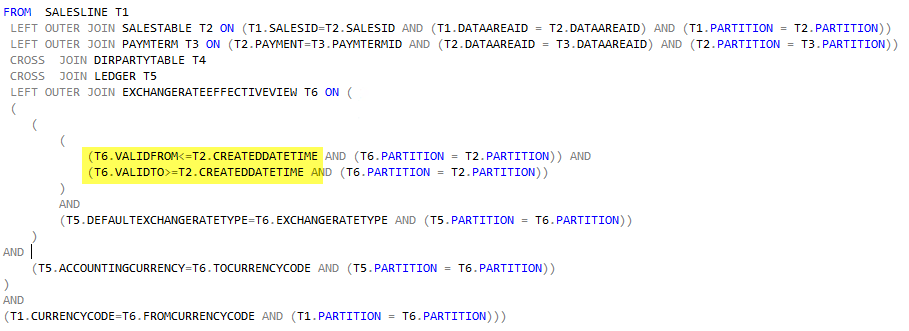
Notice also there is a custom Range on ValidFrom and ValidTo. The Ranges compare the Dates from ExchangeRateEffectiveView with the CreatedDateTime from SalesTable.


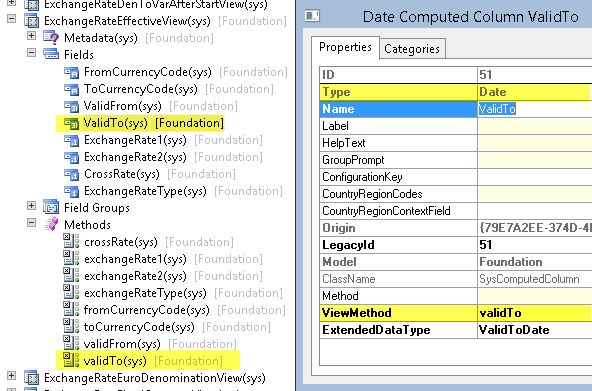
If we look at the definition of the ExchangeRateEffectiveView we see that ValidTo is a field of type Date. Furthermore we see the field is coming from a View Method. But we know CreatedDateTime on SalesTable is a DateTime.
How can it compare a Date with a DateTime? The answer is that actual date is stored in the database as a datetime where the time part is 00:00:00.000.   


So it compares the values and that works like charm. 

The problem

What happens if you have daily exchange rates in your system? Then your ValidFrom and ValidTo becomes the exact same date and more importantly the same time. This will not work correctly since CreatedDateTime also keeps track of what time on the day a Sales Order was created. 

So let's look at one specific example where we have rates for the 9th of December 2014.


And if we run the Sales Order Cube view, and modify the selected columns so we can see the problem, we will notice that the query is unable to collect the rates. The values from Exchange Rates is NULL.


The Solution

There are probably many ways to solve this, but the solution I went for was to make sure that the ValidTo always returns the time part at the max value, which is 23:59.59.000 (AX doesn't operate on the milliseconds, as far as I know).

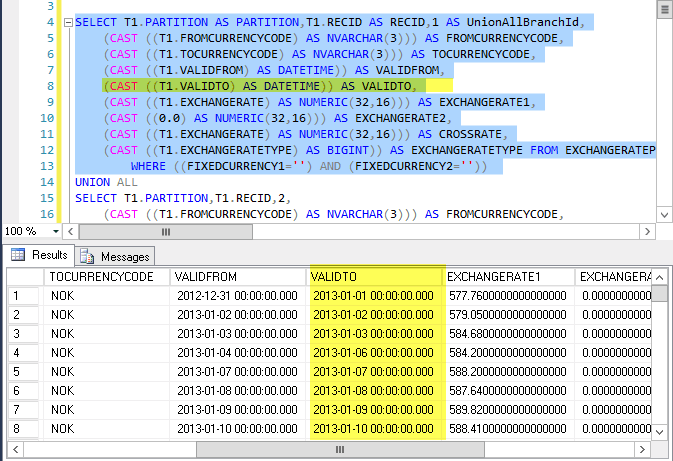
So compare the results coming from the ExchangeRateEffectiveView before I apply the change.


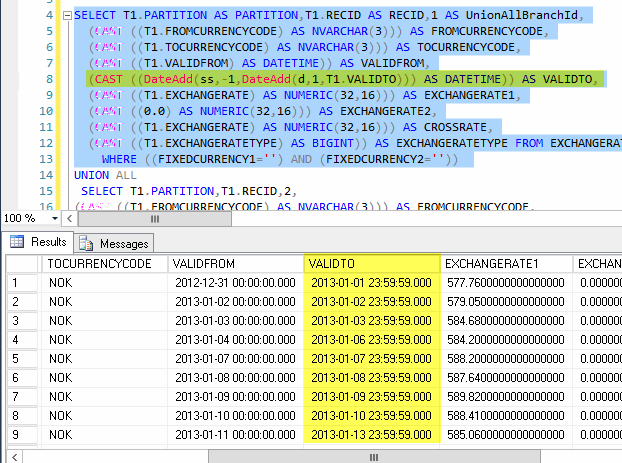
By doing some small changes to the validTo View method, I can give the time part a better value.


And the result is that the Sales Order Cube now has the Cross Rates as expected. 


I hope you enjoyed this post. I sure enjoyed solving this challenge.
Here is the method body (ExchangeRateEffectiveView.validTo):
private static server str validTo(int _branchNum)
{
    str returnString, fieldString, fieldString2, fieldString3;
    boolean generateCode = false;
    DictView dictView;

    // Axdata.Skaue.04.03.2015 
    // Fix ValidTo with proper time 00:00:00.000 -> 23.59.59.000 ->
    str adFixValidToString = 'DateAdd(ss,-1,DateAdd(d,1,%1))';
    // Axdata.Skaue.04.03.2015 <-

    dictView = new DictView(tableNum(ExchangeRateEffectiveView));

    switch (_branchNum)
    {
        case 1:
            returnString = dictView.computedColumnString('VarToVarBefore', 'ValidTo', FieldNameGenerationMode::FieldList, true);
            returnString = strFmt(adFixValidToString, returnString); // Axdata.Skaue.04.03.2015
            break;

        case 2:
            fieldString = dictView.computedColumnString('DenToVarEuroBefore', 'ValidTo', FieldNameGenerationMode::FieldList, true);
            fieldString2 = dictView.computedColumnString('DenToVarEuroBefore', 'FixedStartDate1', FieldNameGenerationMode::FieldList, true);
            // Axdata.Skaue.04.03.2015 ->
            fieldString  = strFmt(adFixValidToString, fieldString); 
            fieldString2 = strFmt(adFixValidToString, fieldString2); 
            // Axdata.Skaue.04.03.2015 <-
            generateCode = true;
            break;

        case 3:
            fieldString = dictView.computedColumnString('DenToDenBefore', 'ValidTo', FieldNameGenerationMode::FieldList, true);
            fieldString2 = dictView.computedColumnString('DenToDenBefore', 'FixedStartDate1', FieldNameGenerationMode::FieldList, true);
            fieldString3 = dictView.computedColumnString('DenToDenBefore', 'FixedStartDate2', FieldNameGenerationMode::FieldList, true);
            // Axdata.Skaue.04.03.2015 ->
            fieldString = strFmt(adFixValidToString, fieldString); 
            fieldString2 = strFmt(adFixValidToString, fieldString2);
            fieldString3 = strFmt(adFixValidToString, fieldString3);
            // Axdata.Skaue.04.03.2015 <-
            returnString = 'CASE when ' + fieldString + ' <= ' + fieldString2 +
                ' and ' + fieldString + ' <= ' + fieldString3 + ' then ' + fieldString +
                ' when ' + fieldString2 + ' <= ' + fieldString3 + ' then ' + fieldString2 + ' - 1 ' +
                ' else ' + fieldString3 + ' - 1  end';
           break;

        case 4:
            returnString = dictView.computedColumnString('SameFromTo', 'ValidTo', FieldNameGenerationMode::FieldList, true);
            returnString = strFmt(adFixValidToString, returnString); // Axdata.Skaue.04.03.2015
            break;

        case 5:
            returnString = '\'21541231\'';
            break;

        case 6:
            returnString = '\'21541231\'';
            break;

        case 7:
            returnString = dictView.computedColumnString('DenToVarAfter', 'ValidTo', FieldNameGenerationMode::FieldList, true);
            returnString = strFmt(adFixValidToString, returnString); // Axdata.Skaue.04.03.2015
            break;

        case 8:
            returnString = dictView.computedColumnString('DenToVarAfterRecipical', 'ValidTo', FieldNameGenerationMode::FieldList, true);
            returnString = strFmt(adFixValidToString, returnString); // Axdata.Skaue.04.03.2015
            break;

        case 9:
            returnString = dictView.computedColumnString('VarToDenAfter', 'ValidTo', FieldNameGenerationMode::FieldList, true);
            returnString = strFmt(adFixValidToString, returnString); // Axdata.Skaue.04.03.2015
            break;

        case 10:
            returnString = dictView.computedColumnString('VarToDenAfterRecipical', 'ValidTo', FieldNameGenerationMode::FieldList, true);
            returnString = strFmt(adFixValidToString, returnString); // Axdata.Skaue.04.03.2015
            break;

        case 11:
            returnString = '\'21541231\'';
            break;

        case 12:
            fieldString = dictView.computedColumnString('DenToDenAfterStart1', 'ValidTo', FieldNameGenerationMode::FieldList, true);
            fieldString2 = dictView.computedColumnString('DenToDenAfterStart1', 'StartDate2', FieldNameGenerationMode::FieldList, true);
            // Axdata.Skaue.04.03.2015 ->
            fieldString  = strFmt(adFixValidToString, fieldString); 
            fieldString2 = strFmt(adFixValidToString, fieldString2); 
            // Axdata.Skaue.04.03.2015 <-
            generateCode = true;
            break;

        case 13:
            fieldString = dictView.computedColumnString('DenToDenAfterStart1Recipical', 'ValidTo', FieldNameGenerationMode::FieldList, true);
            fieldString2 = dictView.computedColumnString('DenToDenAfterStart1Recipical', 'StartDate2', FieldNameGenerationMode::FieldList, true);
            // Axdata.Skaue.04.03.2015 ->
            fieldString  = strFmt(adFixValidToString, fieldString); 
            fieldString2 = strFmt(adFixValidToString, fieldString2); 
            // Axdata.Skaue.04.03.2015 <-
            generateCode = true;
            break;

        case 14:
            fieldString = dictView.computedColumnString('DenToDenAfterStart2', 'ValidTo', FieldNameGenerationMode::FieldList, true);
            fieldString2 = dictView.computedColumnString('DenToDenAfterStart2', 'StartDate1', FieldNameGenerationMode::FieldList, true);
            // Axdata.Skaue.04.03.2015 ->
            fieldString  = strFmt(adFixValidToString, fieldString); 
            fieldString2 = strFmt(adFixValidToString, fieldString2); 
            // Axdata.Skaue.04.03.2015 <-
            generateCode = true;
            break;

        case 15:
            fieldString = dictView.computedColumnString('DenToDenAfterStart2Recipical', 'ValidTo', FieldNameGenerationMode::FieldList, true);
            fieldString2 = dictView.computedColumnString('DenToDenAfterStart2Recipical', 'StartDate1', FieldNameGenerationMode::FieldList, true);
            // Axdata.Skaue.04.03.2015 ->
            fieldString  = strFmt(adFixValidToString, fieldString); 
            fieldString2 = strFmt(adFixValidToString, fieldString2); 
            // Axdata.Skaue.04.03.2015 <-
            generateCode = true;
            break;

    }

    if (generateCode)
    {
        returnString = 'CASE when ' + fieldString + ' <= ' + fieldString2 + ' then ' + fieldString +
            ' else ' + fieldString2 + ' - 1 end';
    }

    return returnString;
}

Saturday, November 29, 2014

Flowchart for Batch in Dynamics AX

Are you utilizing batch for your daily business operations? I've been thinking about blogging about batch in AX for a long time, and a few weeks ago I attended one of the Microsoft webinars sessions where the topic was batch in AX. The support engineer had a brilliant flowchart and I was allowed to publish it. I've reworked it a bit, hoping it will fit the blog space better, but the credit goes to Microsoft's support engineers. :-)

Batch is just yet another great feature of Dynamics AX where you can have operations scheduled to run, sort of like Task Scheduler in Windows. You can have the task be repeated automatically and perhaps have it run during night time when your users are sleeping or partying.

Each Batch Task exists inside what is called a Batch Job, and a Batch Job can have one or more tasks, and the tasks may even be dependent on each other. You may want one task to wait until another one has completed before it starts, and both of them are part of the same Batch Job.

Another important feature of batch is that it runs the operations on the server only. In AX2012 and above, this means it will run the operations in CIL (.Net), which improves performance. That's nice!

I find it interesting to know that the AOS kernel looks for new tasks to fire up every 60 seconds, and it will spawn two threads per CPU core. Also, any AOS can run batch tasks, so you can define dedicated AOSes for batch and perhaps cluster multiple AOSes together. If your AOSes are spread over multiple timezones you can have the same AOS handle users on daytime and batch on nighttime, and visa versa for your other AOSes. Pretty neat!

Back in 2011 Tariq Bell wrote this nice post on how Batch works under the hood. It explains the steps and parts of the code that is involved in the processing of batch tasks. Having a flowchart while reading the textual outline is always helpful.


Understanding how batch works in AX is especially helpful when investigating why tasks remain in Executing Status. In my upgrade projects, batch is heavily involved for running the upgrade scripts, and understanding batch is essential.

From the flowchart above, you see there are tables holding the tasks (Batch) and the "header" of the tasks (BatchJob). There is also a table, BatchGlobal, to help the framework keep track of any tasks running across multiple AOSes. The potential constraints and dependencies between tasks in a job is persisted in the BatchConstraints-table. These are just a few of the elements involved in this framework, as there are quite a few elements involved.


The Premier Field Engineers blogged about tweaking the batch threads settings for improved performance for AX2009, but I expect the post to be just as interesting for those who want to learn for AX2012.

Feel free to reuse the flowchart. Thanks for reading!

Monday, September 8, 2014

Installing Management Reporter 2012 for AX2012

In this post I will go through the process of installing Management Reporter 2012 using its own Setup experience. I will also add a Data Mart for Dynamics AX 2012. You know you can install Management Reporter 2012 using Dynamics AX Setup, but you can also install it using the regular MR 2012 Setup. The Dynamics AX Setup experience is a bit easier because it hides some options which the regular installer doesn't. Hence this little blog post.

Installing the Management Reporter Server

Start by downloading, extracting and running Management Reporter Setup.


When the binaries are installed, choose to let the Configuration Console open after pressing Finish.

In this example I will opt for only installing the Application Service and the Process Service. I could select the Dynamics AX Data Mart now, but I'll set it up afterwards to keep this guide a bit simpler.


I don't need the Access Database engine, so I'll ignore this warning.

You need to define a service account for the service and I have already setup and defined an account in the Active Directory for this.


I will create a new database so I need to provide the SQL Server Instance, the name of the database, a passphrase for encrypting the content of the MR database and finally the account that will be automatically added as first admin of the Management Reporter installation.

By default, the Application Service will listen on 4712 by default. I'll stick with the defaults for the sake of everyone's sanity.


Grab yourself a cup of coffee and let it configure.


 When it is done, you have two running services but no configured applications yet. From File menu, choose Configure and run the Configuration wizard.


Choose the proper application, in my example the Dynamics AX 2012 Data Mart.


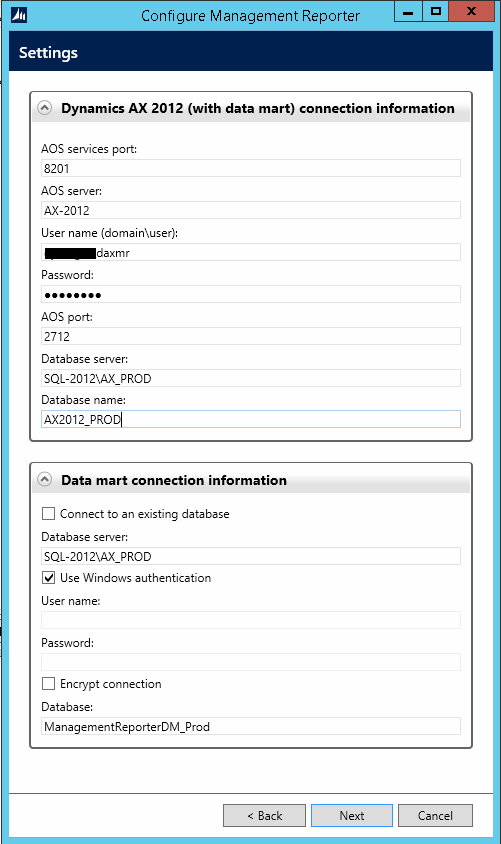
It will need information on how to connect to the right AOS, so provide the name and port for the AOS, and also the SQL Server instance and database name.

It also wants to know where it can put the Data Mart database. If you're running this wizard in the context of a user that can create the necessary database artifacts you can simply let it do so using Windows authentication.

 When it is done, I recommend restarting both services from the Configuration Console.

You will notice a new task pops up in the Task List asking you to enable the integration.
Before doing so, you need to make sure the Management Reporter 2012 service account has the necessary permissions to Dynamics AX, so the recommended step is to add the service account to AX as a user with System Administrator permissions. Not only will it read out financial data, but also information about companies and users.


When clicking the "Enable Integration" you will be prompted for some credentials. If you user context has sufficient permissions to enable the integration, you can choose Use Windows authentication.

When the integration is enabled, it will immidiately start collecting data from the Dynamics AX database. The next important step is to install the client and apply the Management Reporter license. Otherwise, only two users will be able to play with the reporting.


Installing the client is super easy. The only thing you may need to know is what to put in as server connection for the client.

When you have installed the client, open the designer and open the Tools and Registration to paste in your license key.

Now that was pretty easy and straight forward, wasn't it? :-)

Saturday, August 30, 2014

Permission error when setting up additional SSRS instances

Perhaps you read my article on setting up additional SSRS instances and now you notice each time the Report Server instance is restarted it causes reports to throw a weird error like this:

"Error while setting server report parameters. Error message: The DefaultValue expression for the report parameter 'AX_CompanyName' contains an error:"


You can reproduce this by restarting the SSRS instance and try run any report. The first time it fails, but the second run goes through ok. Now, we can't have that can we?

Back in 2012 Microsoft blogged about this issue and the solution so far is to make some minor adjustments on one of the configuration files.

So let's try that and see if that fixes it.

Head over to the location where the rssrvpolicy.config file is and see if you can open and edit it. My preference is NotePad, but any text editor will obviosuly work.


This file may contain a lot of content, so try search for "Report_Expressions_Default_Permissions" and you should only find one occurrence of that text. Now the value you're looking for is "Execute" and you want to change that to "FullTrust".


Save the file and restart SSRS. Head back to AX and observe the reports run perfectly on the first run!

Good job!

Wednesday, August 20, 2014

Upgrade Management Reporter 2012 for ERP

So you installed Management Reporter and have it running like expected. And then later down the road you've been asked to apply the latest (cumulative) upgrade. If you, like me, installed Management Reporter using AX2012 Setup, you will notice the Management Reporter upgrade story involves using Management Reporter Setup, and not AX2012 Setup experience.

No problem! This post by Jill Carter on MSDN Blogs explains the highlights, and I will show you some screenshots from the process. Without any hick-ups this upgrade should over in less than an hour, at least the server bits.

First head over to download page and grab the latest setup with the latest updates. You'll find an upgraded version of the documentation from there as well. At the time of writing this post, the latest documentation is from May 2014. Run, extract and run setup.

Upgrade the Server Components

As Jill explains, you need to upgrade the server bits first, so choose the Server install and run through the setup that will upgrade the services for you. After it is complete, let it open the configuration console as recommended. I highly recommend using the same user for upgrading as you used when you installed in the first place. That way the permissions should already be the properly defined and you won't get into trouble.


When the Configuration Console has loaded you will notice in the bottom left hand side the "tasks" necessary to complete for Management Reporter to be ready on the latest updated version.


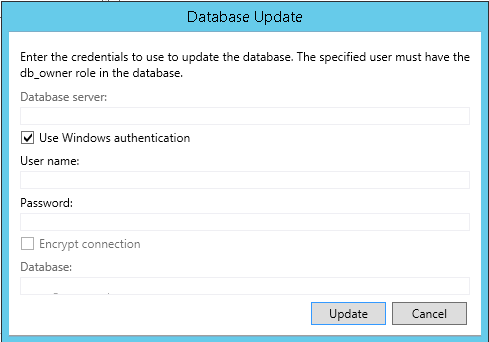
So click the "Update the Management Reporter database"-text and let it help you upgrade the database schema to the latest version. A dialog will pop up and you should be able to update the schema in the context of your current user. Hit Update and wait.


Next click the final task to make sure the integration to the Dynamics AX transaction database is correctly updated. First you will provide the credentials to the Management Reporter integration user. If you remember when setting this up to begin with, you needed to have a dedicated account for Management Reporter and this account would be injected as a user within AX. Dig up your documentation and provide the credentials.


Secondly it will ask for credentials for updating the Datamart database schema. Using your current user should be sufficient.


After it is complete, start the Processing Service and open the logs for the Data Mart Integration. You may need to wait a couple of minutes and hit refresh just to have a check if things look promising (as in no horrible errors).

Upgrade the Client Components

Next we will upgrade the client bits, and I tend to install them on the same server as the server bits so I can test and see things look like expected before I install client bits on terminal servers or client machines.

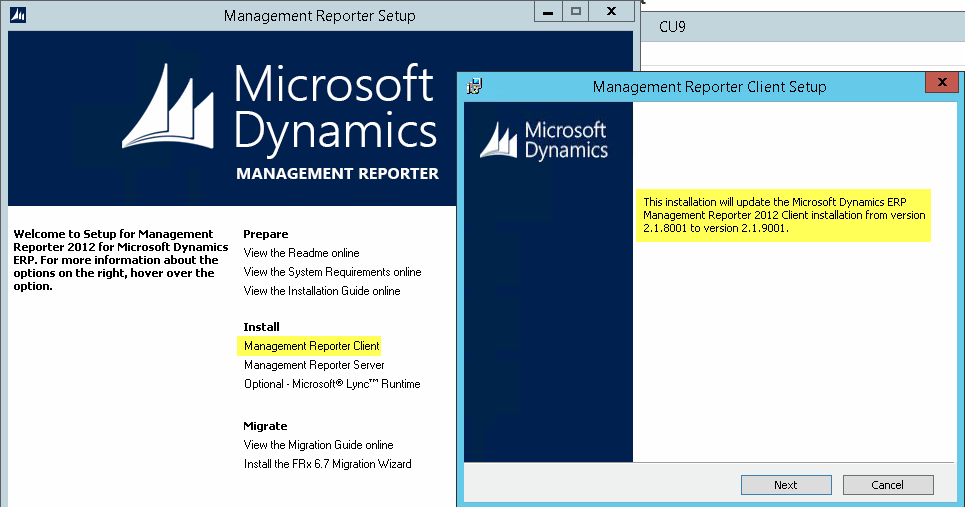
Unless you closed the Management Reporter Setup, you can continue just by clicking the Client install and run through that simple upgrade process.


And again, finally open the designer and check the version number and test any reports if that is your swag.


In order to upgrade the clients, you will redo the client upgrade on any necessary client machine or terminal server, but as you just saw it was a quick and easy experience.

The upgrade I just showed you was CU9 which contains a lot of new and improved features. If you installed Management Reporter using AX2012 R2 Setup which came with CU7, you are most likely on Management Reporter CU7 and you should really consider upgrade to the latest version. Obviosuly, AX2012 CU is not the same as Management Reporter CU - but you knew that already.

Wednesday, April 16, 2014

Error when importing Model downloaded from Internet

If you were to download my compressed AX Model, YetAnotherDynamicsAXModel.zip, to your machine, Windows will most likely tag the downloaded file as unsafe and "blocked".

This is perfectly normal and expected behavior. However, this cause problems if you were to try install the model. After unzipping the content and attempting to install it you would get this error:

CategoryInfo : OperationStopped: (:) [Install-AXModel], PipelineStoppedException
FullyQualifiedErrorId : Exception has been thrown by the target of an invocation.,Microsoft.Dynamics.AX.Framework.Tools.ModelManagement.PowerShell.InstallAXModelCommand


If you were to attempt peek inside the model using Get-AxModel you would get this error:

CategoryInfo : OperationStopped: (:) [Get-AXModel], PipelineStoppedException
FullyQualifiedErrorId : An attempt was made to load an assembly from a network location which would have caused the assembly to be sandboxed in previous versions of the .NET Framework. This release of the .NET Framework does not enable CAS policy by default, so this load may be dangerous. If this load is not intended to sandbox the assembly, please enable the loadFromRemoteSources switch. See http://go.microsoft.com/fwlink/?LinkId=155569 for more information. ,Microsoft.Dynamics.AX.Framework.Tools.ModelManagement.PowerShell.GetAXModelCommand

While the first error isn't really intuitive, the next error gives us an additional clue; "assembly from a network location".

The solution is simple - unblock!

You have the choice to either unblock the downloaded zip.


Or you will have to unblock the AX Model file itself.


After the file is marked as safe and "unblocked", you are good to go!