Saturday, November 16, 2013

Error during installation of Enterprise Portal for AX2012 R2 on SharePoint 2013

I want to just quickly share this with the community. I have not yet narrowed down why this failed, but I have a feeling this might be something I won't encounter too many times when installing Enterprise Portal.

I wanted to setup and install Enterprise Portal for AX2012 R2 (CU6) on SharePoint 2013 and I had already ensured that SharePoint was upgraded with latest upgrades. This SharePoint server was setup by a third party and prepared as just a regular SharePoint Server. I had to prepare the Business Connector as Managed Account. I also created a new Web Application designated for Enterprise Portal. Just to be safe I also created a root Site Collection and tested it ok.

Unfortunately, when I tried to install Enterprise Portal I constantly hit this error:
"Microsoft SharePoint 2010 is not installed or running. Please run the prerequisite utility for more information. Operation is not valid due to the current state of the object."


Now, obviously SharePoint 2010 is not installed, but SharePoint 2013. I believe the last part of the error is the important part. I did decompile the code to see if I could understand why it failed, but didn't find anything obvious.

Instead I found the necessary clue in the setup log. You know everytime you run setup a log is written to disk, normally under "C:\Program Files\Microsoft Dynamics AX\60\Setup Logs\". The log for this run showed me that when it was iterating over the Web Sites, probably for the presentation of them into the drop down list, it failed and threw the error. The last site it was traversing in the log was the default one, "SharePoint - 80".

So I head back to IIS and stopped the Web Site causing Setup to fail and reran setup again. Sure enough, the error was gone and I could successfully select the Enterprise Portal Web Application and continue setup.

Maybe this was just bad luck, or perhaps this will help someone.

Saturday, November 9, 2013

You got to love AXBuild Compiler Tool

Initial testing of AXBuild 

I finally got around to play with the new compiler tool for Dynamics AX 2012 R2 and it really is a game changer. My first attempt of compiling a fresh install of AX2012 R2 with CU7 took a little less than one hour. This was tested on a virtual server with enough RAM and just two logical (virtual) 3.6Ghz processors. Not the result I expected, so I went back to the host system and changed Power Options from Balanced to High and added one more logical processor. The tool will take number of processors, multiply by 3 and divide by 2 to give a count of "workers". Max number of workers are 32, in case you try to run this on a system with more than 21 processors. Lol.

Second attempt now took half an hour, which is good, but not quick enough. Apparently I wasn't completely alone on the system, so after kicking out other variables (aka. colleagues) I was down to around 16 minutes for a full compile. Now this is having the databases hosted on another virtual server, so there are some speed lost in chit-chat, but I am thrilled.


Testing backward compatibility

The next thing I wanted to check was whether or not I could actually (ab)use this new compiler methodology to compile older R2 modelstores, like CU6. Surely a bit far-fetched, and perhaps not really supported, but why not give it a go.

I ran the command line utility and threw in a parameter pointing to a CU6 modelstore. The tool started compiling, but it compiled against the CU7 modelstore and not the one I pointed at. So the tool will take the AOS configuration and compile against the modelstore database defined on the AOS configuration. Not really what I aimed for.

I then tested compiling a CU6 modelstore with a CU7 AOS and I got the same result as described here.
I already had a CU6 AOS prepared for testing if I could start this AOS against a CU7 compiled modelstore, but it fails with the following error:

Object Server 01:  Fatal SQL condition during login. Error message: "The internal time zone version number stored in the database is higher than the version supported by the kernel (5/4). Use a newer Microsoft Dynamics AX kernel."


Upgrade kernels!

I mean, the kernel should be backwards compatible, so having CU7 kernel for client and service running against an older application version of R2 is supported, so the lesson learned is to upgrade kernel binaries to CU7 and enjoy a new and improved compiler tool!

If you run axupdate.exe you have the option to only upgrade the services and client components:


Well served by Microsoft on this one!

Friday, November 1, 2013

About your elements Origin, ID and Handle

This post will be about the elements Origin, their ID and finally the Handle. These are important to grasp as AX developer when creating elements in the Application Object Tree (AOT) and copying them around between environments. I hope it will help both new and old AX developers.

The Origin is made up of a Global Unique ID (GUID), and it will follow the element created throughout its lifetime, from the very first brilliant idea, through all sorts of versions and bug fixes and until is is one day obsoleted; from cradle to grave. This Origin will be the same for this element in all installations, environments, versions and variations. It is unique and special, and it so for a purpose.

Take this table as an example:


The Origin of this table will follow this table from my development environment and into any other installation. If I copy this table using XPO, Model or ModelStore, this is the Origin it will carry everywhere. This also means that if I create "MyTable" in my AX, and you create your "MyTable" in your AX, you can be certain they will have different Origin, and essentially not be the same table.

Take a look at how the Origin is part of the element description when I export it to a XPO.


The same is true if I make an axmodel-file having this table.

So why is this so important? Well, most seasoned Dynamics AX developers have at some point gotten their hands burned on element ID conflict, element cache become invalid, change of element ID causing loss of data and so on. AX 2012 attempts to solve this by letting us forget about element ID altogether and instead focus on Origin. The goal is for us developers only to worry about Origin as identification of Elements.

Great, but what is "Element ID"? Element ID is a unique number identifying elements in the AOT. This ID is used a lot in AX for historical and good reasons. It is a way for the system to quickly identify any element for things like indexing, cache, relations, usage, etc. It works like charm, and is a lot more efficient than using the actual name, path or some other non-numeric reference to the element. Surely a GUID is not a very efficient way to index and organize a long list of elements - just think about it.

Element ID comes into play as soon as en element is created in the AOT, but an important difference compared to the Origin is the fact that the Element ID may perfectly well be different between environments. Element ID is strongly tied to the business data, so if the Element ID is changed or made invalid, you risk loss of data. There are however ways around this, but they are not discussed in this post.

Let us have a look at how Origin works when Elements get their ID in AX during import of a XPO or installation of a Model (axmodel). Details can be found in this Technet Article.


The system will automatically try to reuse Element ID based on Origin, or it will create a new Element ID if necessary. There is also this LegacyID, which is a way to make some IDs backward compatible with previous versions of AX, if really necessary.

As an example, take a look at good old CustTable, number 77. :-)


Also take notice of the Origin and compare it to the Origin in your AX environment. Is it the same? It sure is!

Ok, so what is then Element Handle? It is unique ID identifying every single element in the AOT that is meant to be uniquely identified. It is also the ID being used as key and foreign key in the tables containing the information about the AOT elements (ModelElement, ModelElementData, etc). The system assigns Element Handles just as it does RecIds.

Does that mean Origin and Element ID doesn't cover all possible elements in identifying them? The answer is NO! Take table methods as an example. It does not have an Origin, nor does it have en Element ID. It does have en Element Handle.

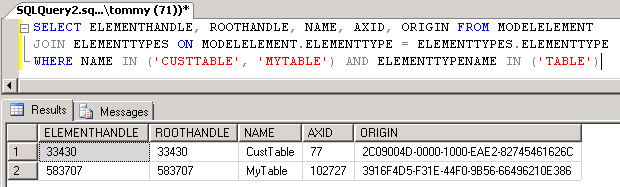
Try run the SQL underneath in your AX environment and see what handles you have for CustTable and a custom table.

SELECT ELEMENTHANDLE, ROOTHANDLE, NAME, AXID, ORIGIN FROM MODELELEMENT 
JOIN ELEMENTTYPES ON MODELELEMENT.ELEMENTTYPE = ELEMENTTYPES.ELEMENTTYPE
WHERE NAME IN ('CUSTTABLE', 'MYTABLE') AND ELEMENTTYPENAME IN ('TABLE')


You may want to replace "MyTable" with a custom table of your own. Notice how my ElementHandle of CustTable differs from yours.

So let's wrap this up with some highlights:
  • Origin is your cradle to grave ID for your new Elements. It is the only ID you really need to worry about.
  • Element ID works pretty much like before, except you no longer keep it between environments. System creates this ID uniquely for you.
  • Element Handles uniquely identifies every single identifiable element in the AOT and is provided by the system.
  • Not all elements have Origin or Element ID, but all elements have a Handle.
  • Finally - Business data is tied to Element ID and not Origin. Don't ever get tempted to mix one modelstores business data with another modelstores business data.
If you ever wonder what elements have ElementHandle but no Origin or ElementID (AxID), you could try run these queries on your modelstore database:

-- Get all element types having Origin but no Element ID
SELECT DISTINCT ELEMENTTYPES.ELEMENTTYPENAME
 FROM MODELELEMENT JOIN ELEMENTTYPES ON MODELELEMENT.ELEMENTTYPE = ELEMENTTYPES.ELEMENTTYPE
 WHERE AXID IN (0) AND ORIGIN NOT IN ('00000000-0000-0000-0000-000000000000') 
 
-- Get all element types having no Origin 
SELECT DISTINCT ELEMENTTYPES.ELEMENTTYPENAME
 FROM MODELELEMENT JOIN ELEMENTTYPES ON MODELELEMENT.ELEMENTTYPE = ELEMENTTYPES.ELEMENTTYPE
 WHERE ORIGIN IN ('00000000-0000-0000-0000-000000000000') 

Thank you for reading!


Sunday, October 27, 2013

Consuming a Web Service in AX 2012 is easy

So there might be a little threshold before you know how to consume your first Web Service, but I encourage any AX developer to set aside at least half an hour to just play with this. There are a lot of good content out there describing how to consume Web Services in AX 2012 (TechNet, White Paper, Mukesh Blog, Joris Blog) so instead of repeating all of those good reads, I wanted to equip you with a dummy service of your own. Then it will be easy to consume it and you will have complete control over both the service providing data and the code in AX consuming the data.

I will assume you have the following installed:

  • Internet Information Server
  • Visual Studio 2010
  • Dynamics AX 2012 Client
  • Dynamics AX 2012 Visual Studio Tools
First, let us create a new Project in Visual Studio. I'm want something easy and swift, so let's choose .Net 3.5 and ASP.Net Web Service Application. I'm naming the Project "PizzaSearchService" and this will automatically be part of the namespace for this application. 


The project loads and you will be presented with the code for "Service1". Now just copy the code underneath and paste it in.

using System.ComponentModel;
using System.Collections.Generic;
using System.Web.Services;

namespace PizzaSearchService
{
    public class PizzaInfo
    {
        public string Name;
        public string Description;
        public double Prize;
    }

    [WebService(Namespace = "http://tempuri.org/")]
    [WebServiceBinding(ConformsTo = WsiProfiles.BasicProfile1_1)]
    [ToolboxItem(false)]
    public class Service1 : WebService
    {
        [WebMethod]
        public List< PizzaInfo > SearchPizza(string query)
        {
            return new List< PizzaInfo > { 
                new PizzaInfo{ 
                    Name = "AX Beef Extreme", 
                    Description = "One of our favourites with mushroom, beef, onion and mozzarella cheese.", 
                    Prize = 12.99 
                }, 
                new PizzaInfo{ 
                    Name = "AX Regular Meatlover", 
                    Description = "The good old classic with mushroom, meat, pepperoni, peppers and mozzarella cheese.", 
                    Prize = 10.99 } 
            };
        }
    }
}

This is just a very simple service that takes a string as an input for a query for pizzas. It then returns a list of two pizzas. I love pizza, so I just couldn't help myself. 

Now we need to build this and deploy it to Internet Information Server (IIS). Depending on your configuration of IIS you might need to prepare a site that runs on an Application Pool that uses .Net 2 instead of .Net 4. Let us quickly go through these steps. I am assuming you're not messing up the settings for some already existing Web Site. If that is the case, you might need to create a different Web Site where you can host this Web Service.

Open Internet Information Services Manager, right-click the Default Web Site and choose Manage Website and Advanced Settings...


Then click choose to select the correct Application Pool. By default IIS will have preconfigured some Applications Pools, and the one we want for now is the one named "Classic .Net AppPool", because it runs .Net 2, and our Web Service is of .Net 3.5 (built on .Net 2).


Having this set, you can head back to Visual Studio and Publish your built solution. Right-click the project and choose Publish...


Select "File System" as Publish method, and then choose a target Location.


Select Local IIS and your Default Web Site.


Now simply press Publish and your Service1.asmx and precompiled binaries will be copied to the location of your Web Site, normally under C:\inetpub\wwwroot\.


You should be able to test the Web Service by opening a browser and navigating to it. Try loading http://localhost/service1.asmx and see what happens. Unless something went horribly wrong, you should see this page listing service entry points and some extra textual description.


If you click the SearchService-link you will get a description of that service and since it takes a simple string you can invoke the service from here.


We already know the service returns the same result each time, so just press invoke and watch it open the result.


This only took you like 5-10 minutes and you're ready to consume this Web Service from within AX 2012. I recommend having a look at one of the blog posts linked above. In short, you need to do the following:

  • Create a new Visual Studio Project
    • Select .Net Framework 4
    • Select a template from Visual C# and Windows
    • Select the Class Library as template.
    • Give it a name like "DynamicsAXPizzaService".
  • Add a Service Reference and point to http://localhost/service1.asmx
  • Add the project to the AOT
  • Deploy!!
Now you are ready to consume it from within AX. You will have to restart the AX client, as already mentioned in the documentation. 

In order to get you started quickly, I wrote this main-method which you can just copy and paste to test if it works. 

public static void main(Args args)
{
    DynamicsAXPizzaService.WebService1.Service1SoapClient   wcfClient;
    DynamicsAXPizzaService.WebService1.PizzaInfo[]          pizzaInfoArray;
    DynamicsAXPizzaService.WebService1.PizzaInfo            pizzaInfo;

    System.ServiceModel.Description.ServiceEndpoint         endPoint;
    System.ServiceModel.EndpointAddress                     endPointAddress;
    System.Exception                                        ex;
    System.Type                                             type;
    int                                                     i, numOfPizzas;

    str name, description, prize;
    ;

    try
    {
        type            = CLRInterop::getType('DynamicsAXPizzaService.WebService1.Service1SoapClient');
        wcfClient       = AifUtil::createServiceClient(type);

        endPointAddress = new System.ServiceModel.EndpointAddress("http://localhost/service1.asmx");
        endPoint        = wcfClient.get_Endpoint();
        endPoint.set_Address(endPointAddress);

        pizzaInfoArray  = wcfClient.SearchPizza("mozarella");
        numOfPizzas     = pizzaInfoArray.get_Count();

        for(i = 0; i < numOfPizzas; i++)
        {
            pizzaInfo   = pizzaInfoArray.get_Item(i);
            name        = pizzaInfo.get_Name();
            description = pizzaInfo.get_Description();
            prize       = pizzaInfo.get_Prize();

            info(strFmt("%1 - %2 - %3", name, description, prize));
        }
    }
    catch(Exception::CLRError)
    {
        ex = CLRInterop::getLastException();

        while(ex)
        {
            info(CLRInterop::getAnyTypeForObject(ex.ToString()));
            ex = ex.get_InnerException();
        }
    }
}

The output when running this class should be this:


Now that you have this working, you can start tamper with it and make it break and learn how the pieces fits together. Here are a couple of things you might want to try understand:
  • What dll is being used when the X++ code is running client side?
    • Tip: have a look at this path: "%localappdata%\Local\Microsoft\Dynamics AX\VSAssemblies\"
  • What dll is being used when the X++ code is running server side?
    • Tip: find the location where your AOS Server files are installed and look for the VSAssemblies-folder under the bin-folder.
    • What about when you activate hot-swapping of assemblies on the AOS?
  • What happens if you deploy new versions of these dlls and you want the client or the AOS to load this new version?
    • Either restart the client or restart the AOS, depending on what dll you want reloaded.
  • What if you plan to have the dll run only server side and never client side, but you need intellisense while developing the X++ code?
    • You need the dll deployed client side on the developer machine. :-)
Finally, I wanted to show you a neat little tool by JetBrains named dotPeek. If you take any of the dlls you just created and drop them into this tool, you can explore the content and even browse the code. I have used this tool in many different scenarios to peek inside managed assemblies.


If you have any concerns or you bump into any issues while trying to follow the steps in this article, please leave a comment underneath. 

Friday, October 18, 2013

Simple encryption and decryption in AX2012

I had a need for hiding some data in the database and I came across this example of encryption and decryption using standard .Net libraries. This is sort of security by obscurity, because any seasoned developer with adequate access can break it, but it is better than nothing if you don't want to store some strings in clear text in the database.

Since X++ in theory should be able to do almost anything you can do in .Net, I wanted to give it a go. I had to change some stuff and make some shortcuts, but it worked. It is rough and I will be change things to improve usability, error handling and performance, and of course programmer documentation. At its current state it is a nice example for this "short" blog post.

I start with this little base class which holds two methods, encrypt and decrypt, both taking a string and returning a string. I haven't so far thought of limiting the length of the string. I leave that open for now.

abstract class AdBaseCryptography
{
}

abstract str encrypt(str _plainText)
{
}

abstract str decrypt(str _cipherText)
{
}

This is my class declaration, holding both some fixed settings for my encryption and instance variables:

public class AdBaseCryptography_Rijndael extends AdBaseCryptography
{
    #define.fixedPassPhrase('Pas5pr@se')
    #define.fixedSaltValue('s@1tValue')
    #define.fixedPasswordIterations(2)
    #define.fixedInitVector('@1B2c3D4e5F6g7H8')
    #define.fixedKeySize(32)

    System.String                                       passPhrase;
    System.String                                       saltValue;
    System.Int32                                        passwordIterations;
    System.String                                       initVector;
    System.Int32                                        keySize;
    System.Text.Encoding                                asciiEncoding;
    System.Text.Encoding                                utf8Encoding;
    System.Byte[]                                       initVectorBytes;
    System.Byte[]                                       saltValueBytes;
    System.Byte[]                                       plainTextBytes;
    System.Byte[]                                       keyBytes;
    System.Byte[]                                       cipherTextBytes;
    System.Security.Cryptography.Rfc2898DeriveBytes     password;
    System.Security.Cryptography.RijndaelManaged        symmetricKey;
    System.Security.Cryptography.ICryptoTransform       encryptor;
    System.Security.Cryptography.ICryptoTransform       decryptor;
    System.IO.MemoryStream                              memoryStream;
    System.Security.Cryptography.CryptoStream           cryptoStream;
    System.String                                       plainText, cipherText;
    System.Exception                                    e;
}

And a protected little initializer. This can be further enhanced by pulling settings from either some provider or table:

protected void init()
{
    passPhrase          = #fixedPassPhrase;         // can be any string
    saltValue           = #fixedSaltValue;          // can be any string
    passwordIterations  = #fixedPasswordIterations; // can be any number
    initVector          = #fixedInitVector;         // must be 16 bytes
    keySize             = #fixedKeySize;            // 32 = 256b, 24=192b or 16=128b
}

This is more or less a rewritten copy of my inspiration:

protected System.String encryptRijndael(
    str             _plainText,
    System.String   _passPhrase,
    System.String   _saltValue,
    System.Int32    _passwordIterations,
    System.String   _initVector,
    System.Int32    _keySize)
{
    try
    {
        new InteropPermission(InteropKind::ClrInterop).assert();

        asciiEncoding       = System.Text.Encoding::get_ASCII();
        utf8Encoding        = System.Text.Encoding::get_UTF8();
        initVectorBytes     = asciiEncoding.GetBytes(_initVector);
        saltValueBytes      = asciiEncoding.GetBytes(_saltValue);
        plainTextBytes      = utf8Encoding.GetBytes(_plainText);
        password            = new System.Security.Cryptography.Rfc2898DeriveBytes(
            _passPhrase,
            saltValueBytes,
            _passwordIterations);
        
        keyBytes            = password.GetBytes(_keySize);
        symmetricKey        = new System.Security.Cryptography.RijndaelManaged();
        symmetricKey.set_Mode(System.Security.Cryptography.CipherMode::CBC);
        encryptor           = symmetricKey.CreateEncryptor(
            keyBytes,
            initVectorBytes);
        
        memoryStream        = new System.IO.MemoryStream();
        cryptoStream        = new System.Security.Cryptography.CryptoStream(memoryStream,
            encryptor,
            System.Security.Cryptography.CryptoStreamMode::Write);
        
        cryptoStream.Write(plainTextBytes, 0, plainTextBytes.get_Length());
        cryptoStream.FlushFinalBlock();
        
        cipherTextBytes     = memoryStream.ToArray();
        cipherText          = System.Convert::ToBase64String(cipherTextBytes);

        memoryStream.Close();
        cryptoStream.Close();

    }
    catch (Exception::CLRError)
    {
        e = CLRInterop::getLastException();

        while( e )
        {
            info( e.get_Message() );
            e = e.get_InnerException();
        }
    }

    return cipherText;
}

And here is my implementation of the encrypt method to wrap it up:

public str encrypt(str _plainText)
{
    System.String cipherValue;

    this.init();

    cipherValue = this.encryptRijndael(
        _plainText,
        passPhrase,
        saltValue,
        passwordIterations,
        initVector,
        keySize);

    return cipherValue;
}

And for decryption, we need this method, again inspired by the original post:

protected System.String decryptRijndael(
    str             _cipherText,
    System.String   _passPhrase,
    System.String   _saltValue,
    System.Int32    _passwordIterations,
    System.String   _initVector,
    System.Int32    _keySize)
{
    System.Int32 plainTextBytesLength, cipherTextBytesLength, decryptedByteCount;

    try
    {
        new InteropPermission(InteropKind::ClrInterop).assert();

        asciiEncoding           = System.Text.Encoding::get_ASCII();
        utf8Encoding            = System.Text.Encoding::get_UTF8();
        initVectorBytes         = asciiEncoding.GetBytes(_initVector);
        saltValueBytes          = asciiEncoding.GetBytes(_saltValue);
        cipherTextBytes         = System.Convert::FromBase64String(_cipherText);
        
        password = new System.Security.Cryptography.Rfc2898DeriveBytes(
            _passPhrase,
            saltValueBytes,
            _passwordIterations);
        
        keyBytes                = password.GetBytes(_keySize);
        symmetricKey = new System.Security.Cryptography.RijndaelManaged();
        symmetricKey.set_Mode(System.Security.Cryptography.CipherMode::CBC);
        decryptor               = symmetricKey.CreateDecryptor(
            keyBytes,
            initVectorBytes);
        
        memoryStream = new System.IO.MemoryStream(cipherTextBytes);
        cryptoStream = new System.Security.Cryptography.CryptoStream(
            memoryStream,
            decryptor,
            System.Security.Cryptography.CryptoStreamMode::Read);
        
        cipherTextBytesLength   = cipherTextBytes.get_Length();
        plainTextBytes          = System.Convert::FromBase64String(_cipherText);
        plainTextBytesLength    = plainTextBytes.get_Length();
        decryptedByteCount      = cryptoStream.Read(plainTextBytes, 0, plainTextBytesLength);
        plainText = utf8Encoding.GetString(plainTextBytes, 0, decryptedByteCount);
        memoryStream.Close();
        cryptoStream.Close();
        
    }
    catch (Exception::CLRError)
    {
        e = CLRInterop::getLastException();

        while( e )
        {
            info( e.get_Message() );
            e = e.get_InnerException();
        }
    }

    return plainText;
}

And the implementation of the decrypt method:

public str decrypt(str _cipherText)
{
    System.String plainValue;

    this.init();

    plainValue = this.decryptRijndael(
        _cipherText,
        passPhrase,
        saltValue,
        passwordIterations,
        initVector,
        keySize);

    return plainValue;
}

In order to test this, I made this little job - just for fun:

static void AdEncryptionTester(Args _args)
{
    AdBaseCryptography_Rijndael cryptography = new AdBaseCryptography_Rijndael();
    str encryptedString;
    str decryptedString, decryptedString2;
    str someOtherTest = 'A1V1nAAMS/N7iCEbiwY54rH5/CH+uRj/l5+l5Qi6EE4=';
    
    encryptedString     = cryptography.encrypt("This is @ test!");
    decryptedString     = cryptography.decrypt(encryptedString);
    decryptedString2    = cryptography.decrypt(someOtherTest);
    info(strFmt('Encrypted=%1, Decrypted=%2', encryptedString, decryptedString));
    info(strFmt('Test 2=%1', decryptedString2));
}

And here is the output:


Now there are other ways to encrypt and decrypt in AX, so take my post as just another example.

EDIT: I've been asked if there are any special considerations for where to run this code in regards to client- or server tier. I just assumed this would be best deployed for server side execution, and I explicitly marked the classes for "server" in the AOT. I imagine this could be deployed for client side execution if it was built as a managed assembly (dll) and deployed client side.

Saturday, October 12, 2013

AXUtilLib - AX Management Utilities version matter

With Dynamics AX 2012 you get this library of tools for all sorts of management tasks, like maintaining your models and modelstores, deploy SSRS reports or Enterprise Portal components and a lot of other cool stuff. While some may argue using command line tools is a set-back compared to rich UI tools, there is a vast number of DevOps (or OpsDev, if you prefer) who without a doubt find this to be a critical component for any major software solution. Before AX2012, I had just briefly tampered with PowerShell, but now I can't do my job (efficiently) without it. PowerShell is awesome!

This blog post is about the importance of the build version of AXUtilLib.dll. When you're running the Dynamics AX Management Shell PowerShell Window, you will by default launch it with whatever build version is installed, normally under C:\Program Files\Microsoft Dynamics AX\60\ManagementUtilities.
You can basically check your current version by running these two lines in PowerShell:

cd 'C:\Program Files\Microsoft Dynamics AX\60\ManagementUtilities'
ls -fi *.dll | % { $_.versioninfo }

Why is this important

Here is a couple of things you might struggle with.

ModelStore Database location

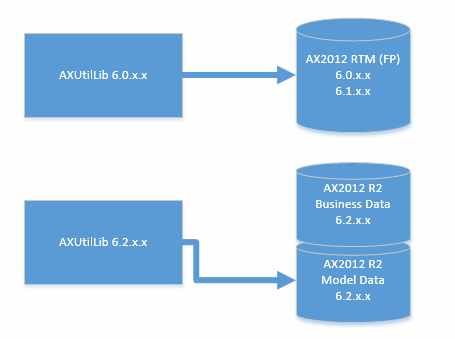
The RTM version will assume your application modelstore is located in the same database as your business data. This is expected behavior in RTM as the business data and the application data resided in the same database.
R2 version will obviously assume the application modelstore is located in a separate database using the "_model" suffix.

Unable to import models from newer version

When you export a model, it is bound to the version of the management utilities you used. Just try export a model to a file and then run this command to view the version:
Get-AXModelManifest -File C:\mymodel.axmodel | Select ModelBuildVersion
If you were to try import this model file using a previous version of Management Utilities you will get an error:
The model file is from a newer version of Microsoft Dynamics AX (version ) and cannot be installed.

How to get around

Say you have upgraded to the latest update of Management Utilities but have an AOS running a previous build and you need to use Management Utilities to import a model. Luckily, when installing the AOS, the installer drops a copy of the AxUtilLib.dll in the AOS bin-folder, and this copy will always (*knock-knock*) be of the same version of that AOS-service. All you need to do is to make sure your command line session uses this version and not the default one.

If your only concern is to install a model, then all you need is AxUtilLib.dll, AxUtil.exe (for Command Line Window) and AxUtilLib.PowerShell.dll (for PowerShell commands). For your own convenience, copy the files to a different path, say C:\AxUtilLib\6.2.1000.1437\.

For a Windows Command line session, simply open MS-DOS Prompt (with Administrator rights, I might add), navigate to the folder and run the necessary commands.

For a PowerShell session, you will have to import the assemblies necessary. Since this example is only about operations against models, we only need a limited set of assemblies.

There is a nice list of commands and assemblies in this nice post by Martin DrĂ¡b.

Friday, October 4, 2013

Baseline is the new old

I remember the very first time I saw the reference to a "Baseline database" in AX2012. It wasn't perfectly clear what the purpose of this database was. I remember thinking it might be some kind of Foundation database or perhaps even the database holding the application code. However, the database was optional, so evidently it had to be something else.

Eventually I learned the purpose of the baseline. It was simply the replacement of "old". If you're not sure what "old" is, it is just that folder holding the previous version of the application layer files in pre-AX2012 installations. This special folder makes it possible for developers to compare elements not only against other application layers, but also a previous version of the same application layer. This can be very helpful when upgrading Dynamics AX from a previous version.

This is how compare looks without Baseline (also known as "old"):

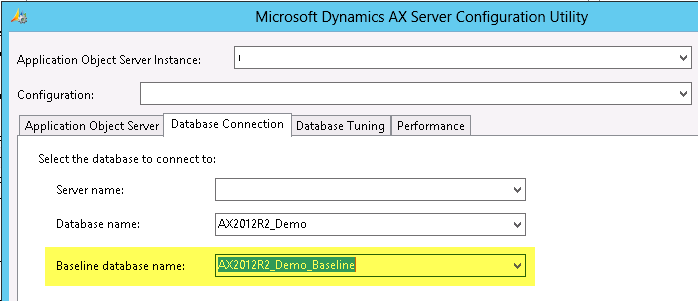
If you don't have a Baseline database, you can easily create it from scratch. It is just a database having the necessary database objects to hold a modelstore. If you have a Baseline database all you need to do is to make sure your Server Configuration points the Baseline Database option to the correct database.


After the AOS is restarted, it will include elements in this database when you do an element compare.


So how would you fill this Baseline with the application layers? Well, you can install AXModels to a Baseline database, but you will probably want to copy the entire modelstore instead.


AX2012 R2 has the neat setup where the ModelStore is in a separate database making copying to "old" easy with regular SQL Server Backup and Restore. If you are using AX2012 RTM or you prefer to use AXUtil or PowerShell, you can export the modelstore from your AX2012 Modelstore database and then import it using the same tools to the Baseline database. If your Server Configuration is set to a Baseline database, you will obviously have to shut down the AOS the minute you plan to apply the modelstore to the Baseline database.

So that is it - baseline is just the new "old". It is probably not "new" to those who have been tampering with AX2012 for a while now, but sometimes old news is also news. :-)